

“The new person starts Monday.”
You find a laptop and guess what access they need. Monday comes, and they wait anyway.
For office managers who became the IT person
Add a person, turn off access, or reset a sign-in from one screen in Teams. Your team gets AI help, and a real person within 10 minutes ($35 a ticket).
Your week, as it really goes
“The new person starts Monday.”
You find a laptop and guess what access they need. Monday comes, and they wait anyway.
“Did anyone shut off their access?”
The laptop came back. You’re still not sure what’s open in their name.
“Can you look at my Outlook?”
You’re not IT. But you fixed it last time, so now you’re the one people ask.
“I sent that request last week.”
Nobody can say where it stands, so you chase it. Again.
None of this is your fault. The work landed on you because it had nowhere else to go.
Why your desk gets quieter
The everyday jobs move to a screen you control, and we do the Microsoft work behind them. The more of the Baseline setup your company uses, the more the AI fixes on the spot, and the less reason anyone has to come to you first.
On computers we look after, nobody has a password, so there’s nothing to forget or reset. And nothing installs without a one-time code that you approve.
If someone gets stuck signing in, you resend their sign-in setup from the Manager Portal. The one-time code works once, and it changes about an hour later. That pause is on purpose. It keeps every computer the same, so a technician can fix one they’ve never seen.
You ask for help the same way your team does. See how help works →
The Manager Portal
A simple screen inside Teams, right next to Chat and Calendar.
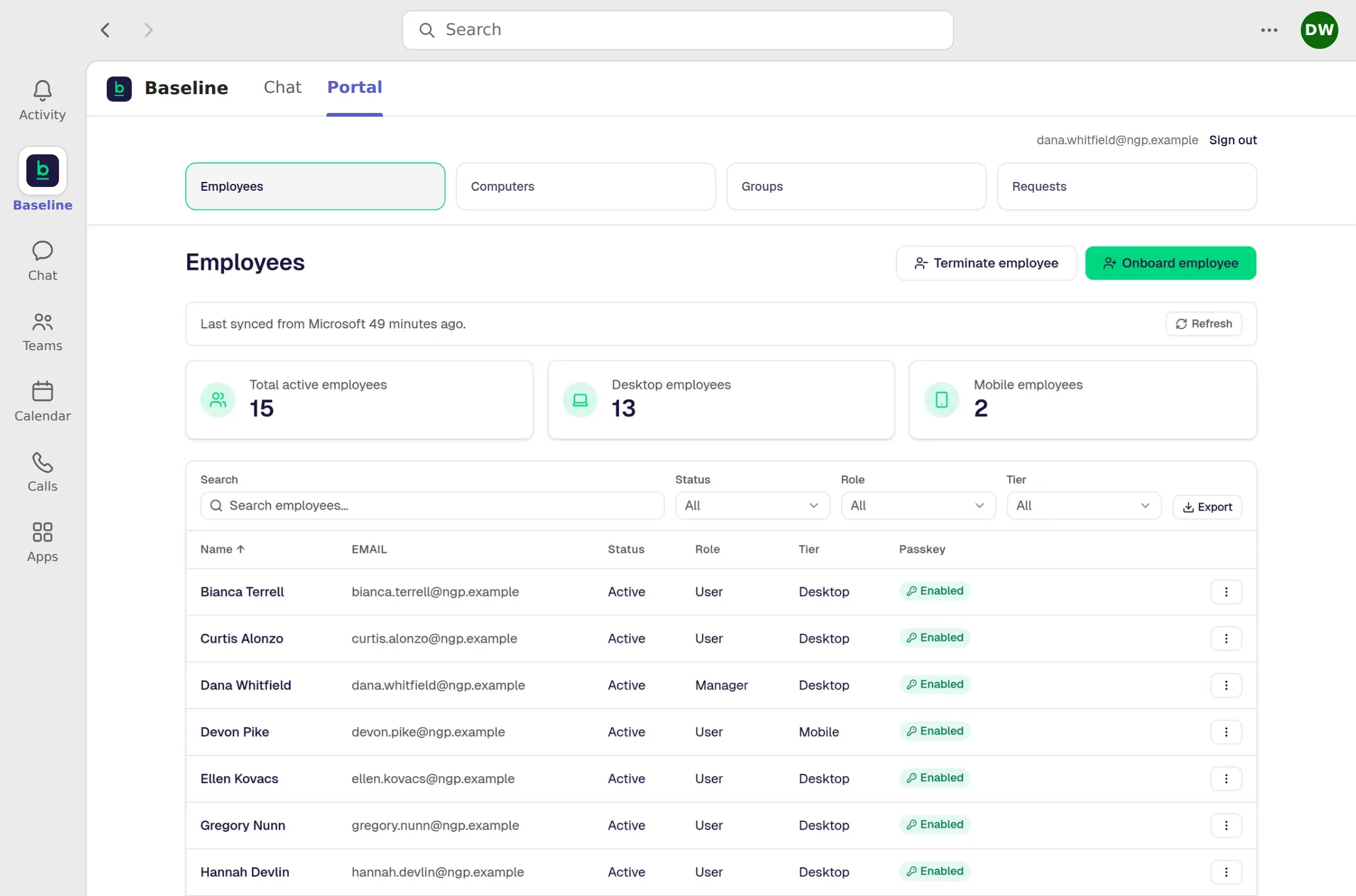
The real Manager Portal. The company and people shown are made up.
What lands on your desk
Each one now has set steps, and you can see where things stand.
A person starts
Enter a name, how they work, and a mobile number. The portal can start their account in less than 30 seconds, and you track it until it’s done.
A person leaves
The portal can start turning off their access in less than 30 seconds. You track it until it’s done.
Sign-in resets, groups, shared inboxes, and program approvals are yours to start, too. The AI assistant in Teams can walk you through any of it.
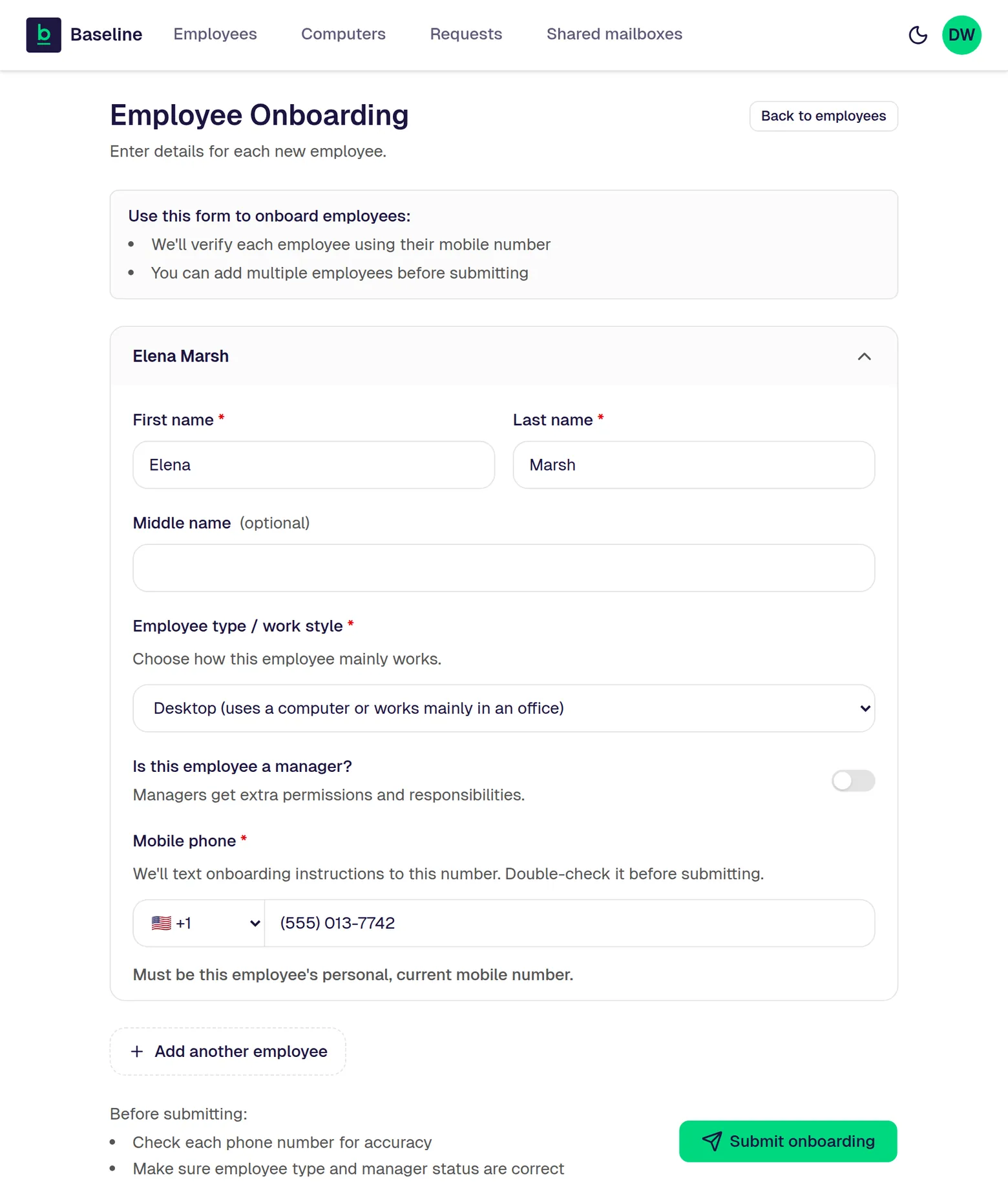
The real screen for adding a person. The person shown is made up.
Baseline starts the change right away, and the new person gets a text with their setup steps.
Microsoft may take a few minutes to finish it.
It walks them through sign-in setup on their phone, at home, in a few minutes.
The company computer becomes theirs and sets itself up.
On computers we look after, nobody can install whatever they want, and yes, those requests come to you. But approving one is a button, not a fix, and it’s one of the two reasons help requests drop.
Make the case
Paste it into an email. It covers the price, what every customer gets, how help works, and the next step, so you don’t have to write it from scratch.
I’ve been looking at Baseline for our IT. The same problems keep coming back, and I’ve ended up as the help desk.
Baseline would build our Microsoft 365 account and run it for us. We’d choose how much else of their setup to use, like computers they look after, files in OneDrive, and Teams meetings. With that setup, people sign in with their face, fingerprint, or a PIN instead of a password. They also watch our Microsoft 365 account for security problems around the clock.
On cost: it’s $45 per user per month for anyone who uses a computer, and $25 per user per month for anyone who works only from a phone. Both include Microsoft 365. It’s an annual commitment, paid monthly. Help from their AI assistant is part of that. Any request a person handles is a $35 ticket, however long it takes. Moving data from our old system is $25 per user, one time, plus $0.99 per GB moved. Project work is priced case by case. They’ll compare our current IT bill line by line.
What we’d agree to: Microsoft 365 for email and sign-in, and the one-year term. The rest is up to us, with no deadline. Anything we keep outside their setup still gets help, usually as a $35 ticket. On the call, Baseline shows us how to tell which computers are ready.
For help, our people would ask in the Baseline app in Teams, or by text. The AI helps instantly, and a real person responds within 10 minutes when a request becomes a ticket, day or night.
As a manager, I’d use the Manager Portal inside Teams to add or remove people, reset sign-ins, and approve new programs.
The next step is five quick questions on the Baseline website. We’d get our Fit Check on the spot, with the price, which parts of their setup we’d use, and what each choice costs. Worth a look?
What you’re probably thinking
Every screen on this page is the real product, and the price is on the pricing page.
Company work lives in Microsoft 365, not only on the laptop that broke. We look after Windows and Microsoft 365, and we’ll help you choose and set up a replacement computer. Help choosing one is a request a person handles, so it’s $35 flat per ticket. Once it arrives, it sets itself up the same way as the others.
No. Keep it if you like, and we still help with it. That help usually goes to a person as a $35 ticket, because the AI only knows the Microsoft 365 setup. Your Fit Check shows what that choice costs.
Is this you?
What you get
A screen where the everyday jobs are buttons.
What goes away
“Can you look at my Outlook?” and chasing requests.
If nothing changes
Every new hire, laptop, and goodbye still comes through you.
What you’d miss
Time back for the job you were hired to do.
The next step
Take the two-minute fit check together, or send it to them. If it looks right, book a 30-minute call and bring the owner along, since they’re the one who can say yes.
P.S. You start the everyday jobs with a button, and Baseline does the Microsoft work behind them. Your team gets instant AI help, and a real person within 10 minutes when they need one, at $35 a ticket, so it doesn’t have to come to you.
It looks like it may be after hours for us right now. You can still fill this out. We’ll call you as soon as humanly possible, and that may be when we’re next in the office.
Leave your name and cell number. We’ll call you as soon as humanly possible. No forms, no fit check.
Keep your phone close. We’ll call you as soon as humanly possible.
It’s after hours for us, so the call may come when we’re next in the office.
Back to the page