
Businesses run on Baseline.
Microsoft 365 management for a business already paying for more than it uses.
Microsoft 365 is usually bought one license at a time and configured by whoever was available. Baseline builds one new Microsoft setup to a documented standard, manages it, and includes the licensing in the price.
Start where you are
Most conversations start with one of these.
“We’re paying for Microsoft and for three other things that do the same job.”
One price per employee with Microsoft licensing included, and duplicate subscriptions come off the bill.
See what it costs“This keeps happening.”
Most recurring Microsoft 365 problems trace back to how the setup was assembled.
See the pattern“Nobody can tell me how our Microsoft 365 is actually set up.”
One documented standard, administered by Baseline, that we can describe to you in full.
See what Baseline manages“Somebody left and still had access.”
Access is created and ended from one place, and a manager can start the removal.
See the portalThe pattern
A Microsoft 365 setup nobody designed.
Almost every small business Microsoft 365 setup was assembled rather than designed. From the inside it usually looks like this.
- Licenses bought as people were hired, so some employees have more than they use and some have less than they need.
- Sign-in nobody can fully audit. Accounts from former employees, guest access from a project that ended, and passwords reused somewhere else.
- Files in three places at once. Personal OneDrive, a couple of SharePoint sites, and whatever is still on the old server.
- Subscriptions that duplicate something Business Premium already includes, each renewing on its own date.
- Security settings changed once, by somebody, for a reason nobody wrote down.
- No single person who can describe the whole configuration accurately.
Why this does not get fixed in place
Every item above is a decision somebody made under time pressure, and every one of them is now load-bearing. Changing them one at a time inside a setup people are using every day is how a Friday afternoon becomes a Sunday. It is also the reason Baseline does not convert an existing setup.
Every Baseline customer starts on a new, clean Microsoft 365 setup built to one documented standard. Email, contacts, calendars, and files move onto it as a planned project. Years of undocumented configuration do not come with them.
What Baseline manages
One Microsoft setup, one documented standard, one company responsible for it.
The same four parts on every customer, configured the same way, so a change made once is a change made everywhere.
Employee sign-in
Every employee gets one company sign-in for email, files, apps, and computer access. They use a face, fingerprint, or device PIN instead of a normal password. Microsoft provides this through Entra, Windows Hello, and passkeys. Access is consistent, recoverable, and harder to compromise.
Computers
Company computers are connected to Baseline to a common Windows standard. A computer is set up, protected, replaced, and supported the same way every time.
Email, files, and collaboration
Outlook, Teams, OneDrive, and SharePoint, configured to one file structure a new employee can navigate on their first week. Subscriptions that duplicate them come off the bill.
Licensing and administration
Microsoft licensing is included in the per-employee price. Baseline holds master access during service, and transfers it cleanly when the relationship ends.
For managers
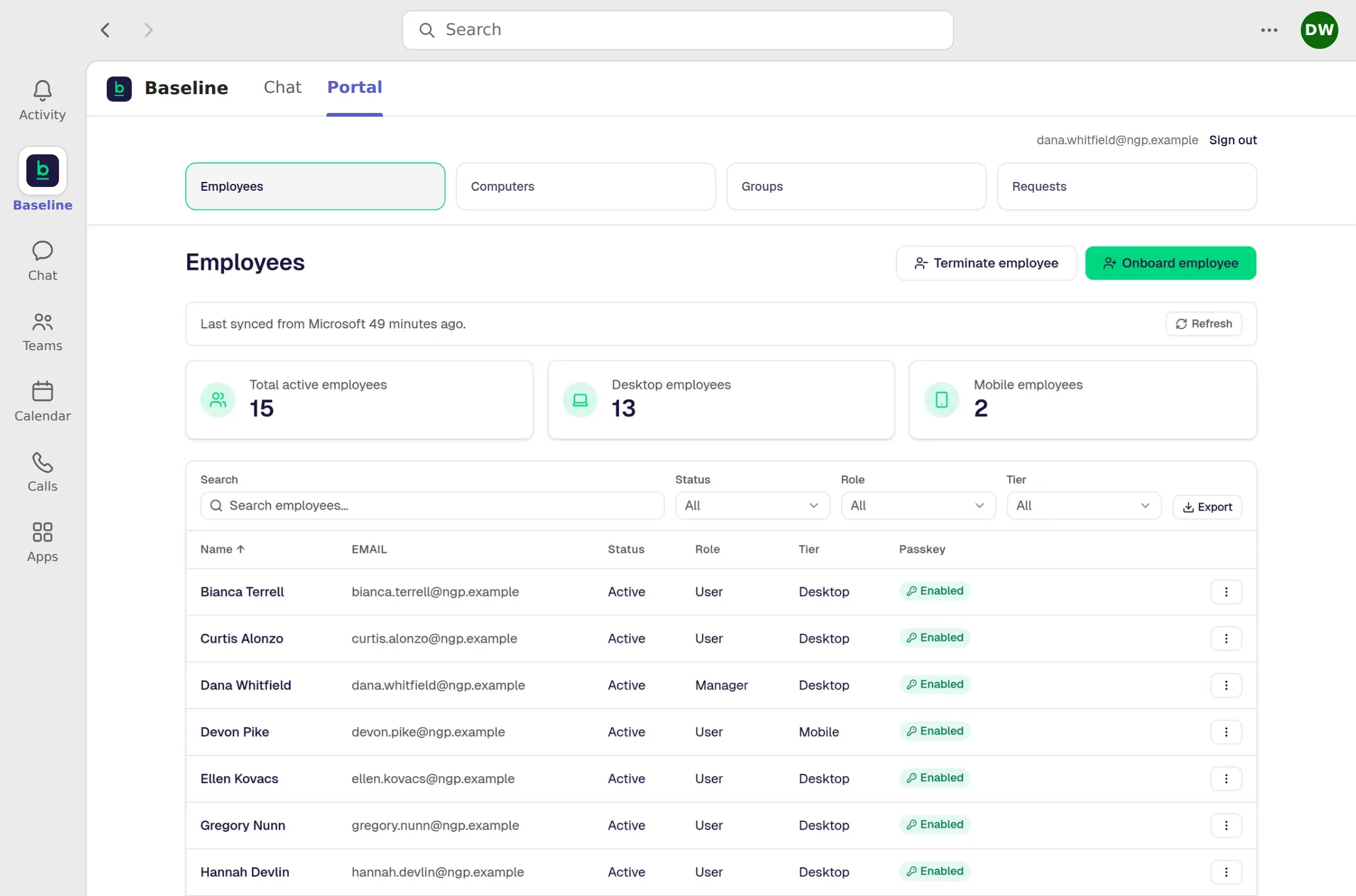
Your managers make the changes, without Microsoft administration.
The reason an old setup drifts is that every change needs a specialist. Baseline moves the ordinary changes into a portal a manager can operate.
- Hire a person. The portal can start account creation in less than 30 seconds.
- Remove a person. The portal can start access shutdown in less than 30 seconds.
- Follow employee onboarding and offboarding through to completion.
- Reset a passkey, see every company computer, and manage shared mailboxes.
- Open a support request and track where it stands.
When a manager adds or removes an employee, Baseline starts the change immediately. Microsoft may take a few minutes to finish applying it. Every screen below shows fictional company data. See the full Manager Portal detail.
The standard and the price
You already pay for Microsoft 365. See what it looks like when someone operates it as one system.
Microsoft 365 licensing is included in the employee price. A Desktop User is $45 per user per month, with the Microsoft 365 Business Premium license included. A Mobile User is $25, with the Microsoft 365 F3 license included. Annual commitment, paid monthly. Baseline builds a new, new setup, administers it to one documented standard, and moves people and data through a planned migration.
Support
One tracked path for help.
Support starts in Teams and follows one tracked remote path during published business hours.
The next step
Stop adding bandages.
See what it would take to run your business on one managed standard.
In 30 minutes, we will map how your company works today, show what Baseline would change, and outline the clearest path forward.